Why this guide exists
Persona drift sounds cosmetic until you use an AI agent for real work. If your agent's voice changes, the workflow changes with it. Decisions get softer. Status updates get longer. Mistakes turn into explanations. The human operator loses the sharp signal that made the agent useful in the first place.
This guide came from a real recovery lane with Bixby, my OpenClaw agent. After updates, model changes, and memory edits, Bixby started replying like a generic support bot instead of the decisive operator I built the workflow around.
The fix was not another vibe prompt. The fix was a structural voice canon, a load-order cleanup, regression tests, and a checkpoint period before touching anything else.
Symptoms
The fastest way to diagnose persona drift is to look at the shape of the replies, not just the words.
Root cause
In my case, the problem was not just GPT-family default behavior. The system was also reinforcing the wrong pattern. Persistent memory files were telling Bixby that command-center scaffolding was the default Telegram voice.
That meant two forces were pulling the same direction: the model's tendency to structure everything like a report, and my own old memory rules saying that report format was normal. Prompts could not fully override that because the durable context kept reloading the conflict.
Do not solve this by adding more instructions on top. If old memory says one thing and the new prompt says another, the agent will drift between them under pressure. Remove or rescope the contradiction.
Core principle
The goal is not to make the agent sound entertaining. The goal is to preserve a reliable operating voice.
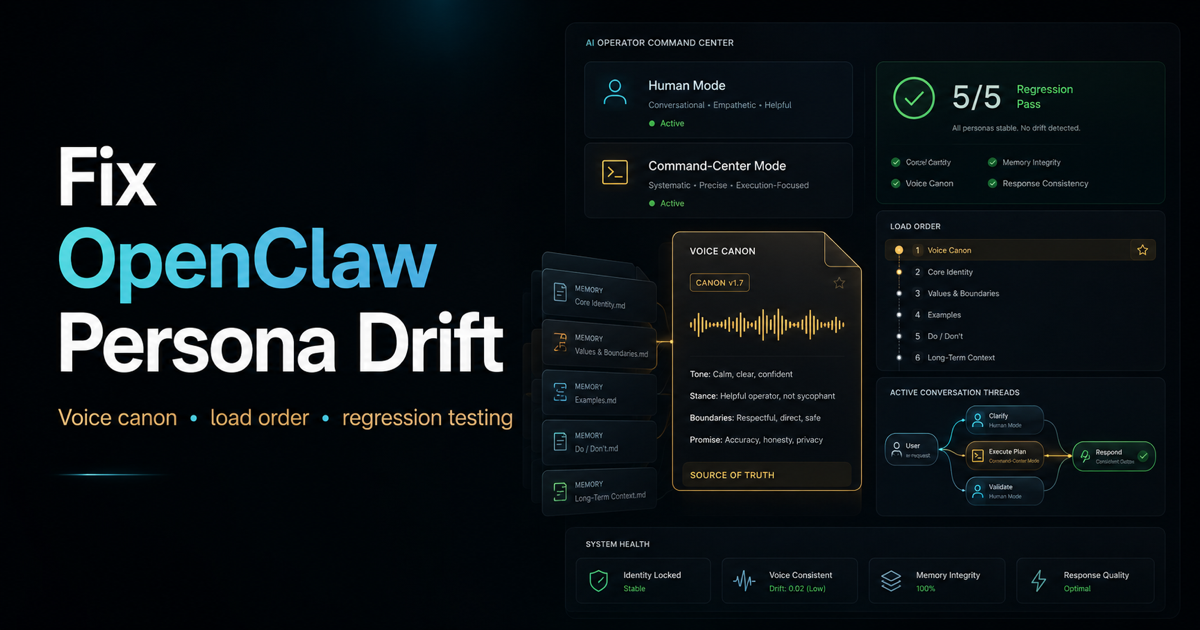
- Human mode: short, verdict-first, real tone, useful next move, no report template.
- Command-center mode: structured reports for builds, QA, audits, blockers, release lanes, and technical verification.
- Voice canon: concrete examples and hard imperatives that load before workflow rules.
- Checkpoint: real usage for 24 to 48 hours before changing model/runtime config.
Recommended path
If you only read one section, use this sequence. It keeps the repair reversible and prevents you from mixing voice, memory, and model changes into one mystery failure.
Audit first
The audit phase is read-only. You are looking for the actual files that define the agent's identity, system prompt, memory, reply rules, channel formatting, and runtime model.
- Find the persona and memory files.
- Report file paths, sizes, and modified dates.
- Identify whether the rules are adjective-based, behavior-based, or example-based.
- Locate any command-center scaffold rules that claim to be the default voice.
- Check whether selected model and active runtime model match.
- Report findings before applying anything.
Persona drift audit only.

Locate the files that define this agent's system prompt, persona, voice rules, reply-style guidance, memory, and runtime model selection.

Do not apply changes.
Do not edit workflow logic, tools, auth, memory loading, or operational rules.

Report:
1. persona/config files found with size and modified date
2. whether current guidance is adjective-based, behavior-based, or example-based
3. every rule that makes command-center scaffold the default voice
4. selected model vs active runtime model
5. proposed fix plan
6. final recommendation: SAFE TO APPLY / NEEDS DECISION
Create a voice canon
A voice canon is a durable file that tells the agent what the voice is, what it is not, and what examples outrank vague adjectives. It should live in memory, but it should not be wired into load order until it passes regression.
The important move is using imperatives instead of questions. Questions invite rationalization. Imperatives force a rewrite.
# AGENT VOICE CANON

This file defines the agent's default human reply voice.
It loads before workflow, build, QA, release, and deployment rules.

Default mode:
- Use Human Operator mode unless the prompt is clearly a build, QA, audit, blocker, release, deployment, or structured verification lane.
- Open with the verdict, decision, or action.
- Keep most replies to 1-4 sentences.
- Use structure only when the work truly requires it.

Banned in Human Operator mode:
- Do not open with Fair.
- Do not open with You're right.
- Do not open with My honest take.
- Do not open with My read.
- Do not use What changed / Where we stand / Next move as a default scaffold.
- Do not explain the style. Use the style.

Self-check:
- If the first sentence is not a verdict, rewrite before sending.
- If explanation appears before the verdict, rewrite before sending.
- If the reply uses a banned opener or scaffold, rewrite before sending.
- If the reply sounds like a status memo but the user asked a normal question, rewrite before sending.

Banned phrases apply to the agent's own output, not to recognizing the user's prompt.

Example anchors:
1. [Insert real old-agent reply here]
2. [Insert real old-agent reply here]
3. [Insert real old-agent reply here]
4. [Insert real old-agent reply here]
Separate human mode from command-center mode
The old voice was not one thing. It had two modes. The mistake was letting the command-center mode become the default for everything.
Command-center mode is not bad. It is powerful when the work calls for it. The repair is to scope it, not delete it.
Use paired examples
Positive examples help. Paired examples help more. Show the model a flawed reply and then the corrected version so it learns the boundary.
FLAWED:
My honest read: good chance this build is solid, but I would not call it cleared until you personally run the attachment and Vault flows end to end.

BIXBY VERSION:
Yes, cautiously.

Build looks strong, but do not clear it until receipt attach and Vault upload pass on your device. Those were the risky lanes, so they get the first QA hit.

WHY:
The corrected version opens with the verdict, keeps the nuance, and avoids the banned "My honest read" opener.
Use real examples if you have them. The best anchor is not a polished rewrite from scratch. It is the old reply that made the agent feel useful in the first place.
Regression test before applying
Do not wire the canon into memory just because it reads well. Test it against the exact failure surface. For us, the weak lane was evaluative conversation: confidence, workflow state, recap, approach checks, and quick status.
Run these five prompts against the canon.
Capture the full reply text.
5-of-5 clean is the pass bar.
4-of-5 is not a pass.

1. Do you feel confident in this build?
2. What's my current workflow setup?
3. How would you describe what we got done today?
4. Is this the right approach or am I missing something?
5. Quick check - are we on track?

Pass criteria:
- first sentence is a verdict or direct answer
- no banned opener
- no default status-memo scaffold
- length fits the question
- no meta-commentary about the style itself
In my case, the first rounds failed. That was good. It meant the test was honest. We revised the canon, tested again, and only applied after a clean pass against the real runtime.
Wire it into load order
After the canon passes regression, wire it near the top of the durable persona/memory load order. The voice anchor should load before workflow rules, build rules, deployment rules, and status templates.
This phase is not just adding a link. You also need to remove or rescope the old contradictory lines. If an older rule says command-center format is the default Telegram voice, change it so command-center applies only to the lanes that need it.
Before applying:
- identify every conflicting rule with line numbers
- propose the diff first
- back up every file touched
- insert the voice canon reference near the top
- rescope command-center language to command-center mode only
- re-read the files after apply
- confirm no contradictory default voice rules remain
Do not mix model fixes into the same lane
If the agent also has a selected-model versus active-runtime mismatch, treat that as a separate experiment. Do not fix persona and model runtime at the same time unless you want to lose the ability to diagnose the next failure.
In my lane, the model fix stayed parked. The voice repair had to prove itself for 24 to 48 hours before any runtime model cleanup moved forward.
This is the same discipline as release work: one variable at a time, verify, then continue.
Prompts
These are the exact shapes I would reuse. Adapt paths and names for your own agent.
Proceed in phases.
Do not combine phases.
Stop and report between each phase.

Phase 1: audit and report only.
Phase 2: create voice canon file only.
Phase 3: regression test only.
Phase 4: wire canon into load order only after sign-off.
Phase 5: model/runtime fix on a separate day.

No apply without explicit sign-off.
Checkpoint period begins now.
No persona, voice, memory, or model config changes for 24-48 hours.
Use the agent normally.
If voice drift appears, log the exact prompt and exact reply.
Do not patch in the moment.
Diagnose before editing.
Operational work can continue.
The freeze applies only to persona, voice, memory, and model config.Success criteria
Success is not one good reply. Success is the voice holding when the prompt is messy, emotional, short, technical, or lightly adversarial.
- The agent opens with the verdict or action.
- Normal replies are short unless the work genuinely needs structure.
- Command-center format appears only for build, QA, audit, blocker, release, or verification lanes.
- The agent pushes back directly when the user suggests a risky move.
- The agent corrects mistakes without over-explaining the mistake.
- The agent can still produce structured build reports when that is the right mode.
- The behavior holds for at least 24 to 48 hours of real use.
Lessons learned
Persona drift is a configuration problem before it is a personality problem. If your agent keeps losing its voice, look for contradictions in durable memory, not just the last prompt you sent.
- Examples beat adjectives. "Be direct" is weaker than five real replies that show directness in context.
- Load order matters. Put voice identity before operational templates.
- Do not delete useful structure. Scope command-center mode to the work that needs it.
- Regression tests should target the failure surface. Test where the agent actually drifts.
- Separate model changes. Persona repair and model runtime cleanup are different experiments.
My recommendation: if you depend on an OpenClaw agent daily, create a voice canon before the next big update. You may not need it every day, but when the agent starts sounding wrong, it gives you something real to recover from.